How to Make Your Script Post Actually Rank on Google
Look, I'm going to be honest with you. Most script posts uploaded to Rscripts never get the traffic they deserve. Here's what separates the successful ones from the rest.
Written by the Rscripts Creator
Based on real data from thousands of script posts
Let's Talk Reality
The majority of people who have made a lot of money and gained a ton of users from their script posts did it by having a fully optimized post. Why? Because the majority of traffic that flows to Rscripts comes directly from Google itself.
Sure, our explore page brings in some traffic too, but with so many scripts uploaded nowadays, it's really just required to get those high Google rankings if you want your script to be discovered.
Here's My Story
I'm the owner of this website, and I've uploaded scripts myself. One of them is called RedzHub. That script used to rank extremely high on Google for terms like "Blox Fruits script" and "RedzHub" — and because of that, it brought in an insane amount of traffic and users.
As of writing this, the post doesn't rank as high anymore — likely because RedzHub is currently discontinued. But here's a screenshot showing just how much traffic it pulled in from Google alone in the last 30 days:
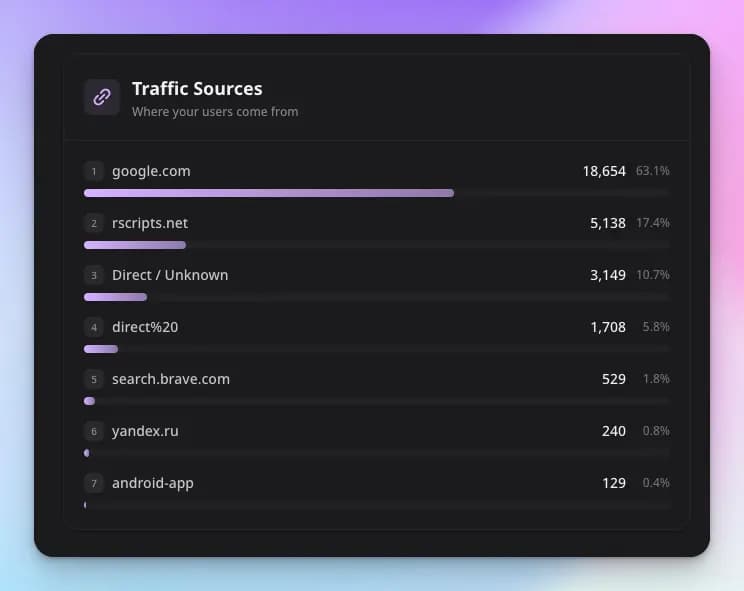
This data is from the Script Insights feature, available with a Pro subscription.
This isn't theory. This is what actually works. Let me break down exactly what makes a script post rank.
What Makes a Script Post Rank High on Google?
You Already Have a Head Start
First things first — you need a domain with high authority that's been around for a while. That's the foundation of ranking on Google.
The good news? Rscripts.net is extremely well-established in the Roblox scripts market. By uploading here, you're already leveraging a domain that Google trusts. You've got a head start that most people don't even realize.
Your Title Matters More Than You Think
Keep your title descriptive but not too long. It should clearly tell people what your script does.
Examples:
✓ "Auto Farm Script for Blox Fruits"
✓ "ESP & Aimbot Universal Script"
✗ "BEST SCRIPT EVER MUST DOWNLOAD NOW FREE WORKING 2024!!!"
Google sees right through clickbait. Be honest and specific.
Your Description is EVERYTHING
This is where most people mess up. Your description isn't just for decoration — it's the main content Google reads to understand your post.
Use Lists for Instructions
If there's something the user needs to know to use your script properly, use a list. The editor has a built-in list feature — use it.
Step-by-step instructions work great:
- Copy the script from the Script tab
- Open your executor
- Paste and execute
- Press the keybind to open the menu
This reduces friction. When users can easily figure out how to use your script, they keep coming back — and that's a huge signal for Google that your content is valuable.
User Experience = Google Rankings
Here's something most people don't realize: Google pays attention to how users interact with your page.
If people land on your script, immediately understand what it does, use it successfully, and come back for updates — that tells Google your post is actually helpful.
Make your description as user-friendly as possible. Zero friction means users keep coming back, and that's an extremely good signal for Google to rank your post higher.
Quick Recap
- 1Rscripts already has domain authority — you're starting with an advantage
- 2Keep your title descriptive but concise — no clickbait
- 3Write a detailed description explaining what your script does
- 4Be transparent about key systems, requirements, or limitations
- 5Use lists for step-by-step instructions — reduce friction for users
- 6Good user experience = returning users = better Google rankings
Ready to Upload?
Now that you know what it takes, go create a script post that actually ranks. Take your time with the description — it's worth it.